
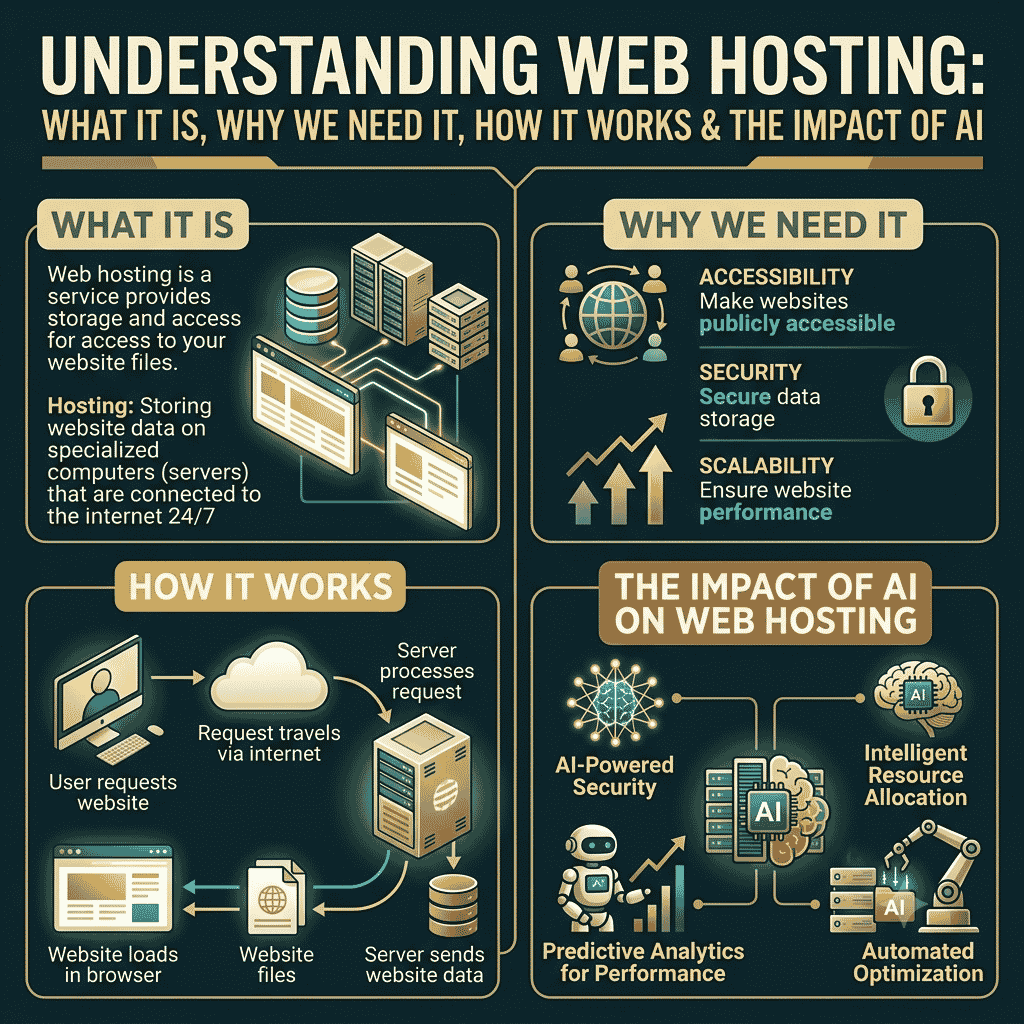
Web Hosting: What It Is, Why We Need It, How It Works, and the Impact of AI
Introduction
When you create a website, you need more than just a domain name. Your website’s files—such as HTML, CSS, JavaScript, images, videos, databases, and applications—must be stored on a computer that can continuously provide them to visitors over the internet. This service is called web hosting.
In simple words, hosting is the place where your website lives on the internet. A domain name is the address that helps people find it, while hosting provides the server space where the website’s content is stored.
What Is Web Hosting?
Web hosting is a service that provides the server infrastructure needed to store and deliver a website or web application.
When someone enters a website address into a browser, the browser connects to the appropriate server and requests the website’s files. The server processes the request and sends the required content back to the visitor’s browser.
For example:
Domain: example.com
Hosting: The server where the website’s files are stored.
A simple comparison is:
Domain = Address
Hosting = House
Website = Contents inside the house
Without hosting, registering a domain alone does not give you a functioning website.
Why Do We Need Web Hosting?
1. To Store Website Files
Hosting provides storage for files such as:
- HTML
- CSS
- JavaScript
- Images
- Videos
- Documents
- Databases
- Website applications
2. To Make a Website Available 24/7
A hosting server is designed to remain connected to the internet so visitors can access your website at different times.
3. To Handle Website Traffic
When visitors access your website, the server sends the required content to their browsers. Good hosting can help a website handle more visitors.
4. To Run Web Applications
Hosting can provide the environment required for platforms and applications such as WordPress, ecommerce systems, databases, and custom web applications.
5. To Improve Website Performance
Hosting resources such as CPU, RAM, storage technology, server configuration, caching, and network connectivity can affect website performance.
6. To Support Business Websites
Businesses use hosting for websites, ecommerce stores, landing pages, blogs, portfolios, booking systems, and web applications.
How Does Web Hosting Work?
The process is relatively simple.
Step 1: Buy a Domain
You register a domain such as:
mybusiness.com
Step 2: Purchase Hosting
You purchase a hosting plan from a hosting provider.
Step 3: Upload Your Website
Your website files are uploaded to the hosting server.
For WordPress, you may install WordPress and create the website through the WordPress dashboard.
Step 4: Connect Domain and Hosting
The domain’s DNS settings are configured to point toward the hosting service.
Step 5: Visitor Enters the Domain
A visitor types:
mybusiness.com
into a browser.
Step 6: DNS Finds the Server
The DNS system helps translate the domain name into information that directs the browser toward the appropriate server.
Step 7: Server Responds
The hosting server receives the request and sends the required website resources.
Step 8: Browser Displays the Website
The visitor’s browser downloads and processes those resources and displays the website.
The basic flow is:
Visitor → Domain → DNS → Hosting Server → Website Files → Browser → Website
Types of Web Hosting
There are several common types of hosting.
1. Shared Hosting
Multiple websites use resources on the same server.
Best for:
Small websites, blogs, portfolios, and beginners.
Advantages:
- Affordable
- Easy to use
- Beginner-friendly
Disadvantages:
- Resources are shared
- Performance can be affected by server usage
- Less control than advanced hosting
2. VPS Hosting
VPS means Virtual Private Server.
A physical server is divided into multiple virtual servers. Each VPS receives allocated resources and provides more control than typical shared hosting.
Best for:
- Growing websites
- Developers
- Medium-sized businesses
- Applications requiring more control
3. Dedicated Hosting
With dedicated hosting, a customer gets an entire physical server.
Best for:
- High-traffic websites
- Large applications
- Businesses requiring significant server resources
It usually costs more than shared or VPS hosting.
4. Cloud Hosting
Cloud hosting uses a network of servers and computing resources rather than relying on a single traditional server configuration.
Advantages can include:
- Scalability
- Flexible resource allocation
- High availability depending on architecture
Cloud hosting is widely used for modern applications and businesses.
5. Managed WordPress Hosting
This type of hosting is specifically optimized for WordPress websites.
Depending on the provider, the service may include features such as:
- WordPress installation
- Automatic updates
- Backups
- Security tools
- Performance optimization
- Technical support
Some Popular Hosting Platforms
Several companies provide web hosting services, including:
- Hostinger
- GoDaddy
- Bluehost
- SiteGround
- Namecheap
- DreamHost
- HostGator
- AWS
- Google Cloud
- Microsoft Azure
- DigitalOcean
Different platforms are designed for different users. Beginners may prefer simple managed hosting, while developers and larger companies may choose cloud infrastructure such as AWS, Azure, or Google Cloud.
What Was the First Web Hosting Platform?
The history of web hosting is closely connected with the development of the World Wide Web.
The first website was created by Tim Berners-Lee at CERN and became publicly available in 1991. It was hosted on a NeXT computer at CERN.
However, it would be inaccurate to call this a modern commercial “hosting platform” in the same sense as today’s Hostinger, AWS, or GoDaddy.
Commercial web hosting developed later as the web expanded and individuals and businesses needed companies to provide server space and internet connectivity.
So there is an important distinction:
First website/server hosting: early World Wide Web infrastructure at CERN.
Modern commercial web hosting: developed later as businesses began selling server and hosting services to the public.
What Is the Difference Between Domain and Hosting?
Many beginners confuse these two concepts.
| Domain | Hosting |
|---|---|
| Website address | Server/storage for website |
| Helps users find the website | Stores and delivers website files |
Example: example.com | Server where example.com website lives |
| Registered through a registrar | Purchased from a hosting provider |
| DNS connects it to hosting | Provides server resources |
For a normal website, you generally need both a domain and hosting, although some platforms bundle them together.
How AI Is Affecting Web Hosting
Artificial intelligence is increasingly influencing web hosting and server management.
AI is not replacing the fundamental need for servers. Websites and applications still need computing infrastructure. Instead, AI is changing how hosting infrastructure is managed, optimized, secured, and used.
1. AI-Assisted Server Management
AI can help analyze server metrics such as:
- CPU usage
- Memory usage
- Traffic
- Response times
- Error rates
This can help hosting providers identify unusual behavior and potential performance problems.
2. Better Performance Optimization
AI systems can analyze website traffic and resource usage and help determine where optimization may be useful.
For example, AI can help identify:
- Slow-loading resources
- Traffic patterns
- Resource bottlenecks
- Caching opportunities
- Unusual spikes
This can help hosting providers improve infrastructure efficiency.
3. AI-Powered Security
Cybersecurity is an important part of hosting.
AI can help detect unusual patterns that may indicate:
- Bot attacks
- Brute-force attempts
- Suspicious traffic
- Malware behavior
- Distributed denial-of-service activity
AI-based detection can supplement traditional security systems.
4. Automated Scaling
AI and automation can help predict changes in demand.
For example, an ecommerce website might experience a large increase in traffic during a sale.
Intelligent infrastructure can help identify traffic changes and allocate additional resources when the hosting architecture supports automatic scaling.
5. AI Customer Support
Hosting companies increasingly use AI-powered assistants to help customers with common questions.
AI can assist with issues such as:
- Domain configuration
- DNS
- WordPress installation
- SSL certificates
- Hosting settings
- Website errors
Complex technical problems may still require human support.
6. AI Is Increasing Demand for Computing Infrastructure
Generative AI applications require substantial computing resources.
AI workloads often need:
- Powerful CPUs
- GPUs
- Large amounts of memory
- High-speed networking
- Large-scale storage
- Data centers
- Cooling systems
As AI adoption increases, demand for specialized infrastructure and cloud computing is also increasing.
This means AI is not simply changing hosting—it is also creating a new category of infrastructure requirements.
How AI Can Help Website Owners
AI can also help the customer using hosting.
For example, AI tools can help website owners:
- Generate website content
- Write code
- Create product descriptions
- Optimize SEO content
- Analyze website performance
- Generate images
- Create chatbots
- Automate customer support
- Analyze website traffic
- Detect potential technical problems
This makes it easier for small businesses and individuals to build and manage websites without having extensive technical knowledge.
The Future of Web Hosting
The future of hosting is likely to involve greater automation, cloud infrastructure, edge computing, AI-assisted security, and intelligent resource management.
Websites will increasingly be connected to AI-powered applications such as:
- AI chatbots
- AI search
- Recommendation systems
- Automated customer service
- Generative content tools
- AI analytics
- Intelligent ecommerce systems
At the same time, important factors such as security, reliability, speed, scalability, privacy, and cost will remain central when choosing hosting.
Conclusion
Web hosting is the infrastructure that allows websites and web applications to be stored and delivered through the internet. A domain provides the address, while hosting provides the server environment where the website operates.
From the early web servers used at CERN to today’s cloud platforms and AI infrastructure, hosting has evolved significantly. Modern hosting providers offer everything from simple shared hosting to powerful cloud and dedicated infrastructure.
AI is now influencing hosting through automation, performance monitoring, security, customer support, predictive resource management, and infrastructure optimization. At the same time, the growth of AI applications is creating greater demand for powerful data centers and computing infrastructure.
For anyone working in digital marketing, website development, or online business, understanding hosting is essential because website performance, availability, security, and scalability all depend heavily on the underlying hosting environment.